
For pizza restaurants
Kitchen software for pizza restaurants.
Zatila keeps a pizza kitchen on spec: how far to stretch, how much sauce and cheese, how long in the oven, and what the toppings rail is short on, on a tablet the whole make line can read. Upload your menu and prep sheets, and Zatila sets up everything for you.
30-day free trialNo card neededUnlimited tablets
What does kitchen software do for a pizza restaurant?
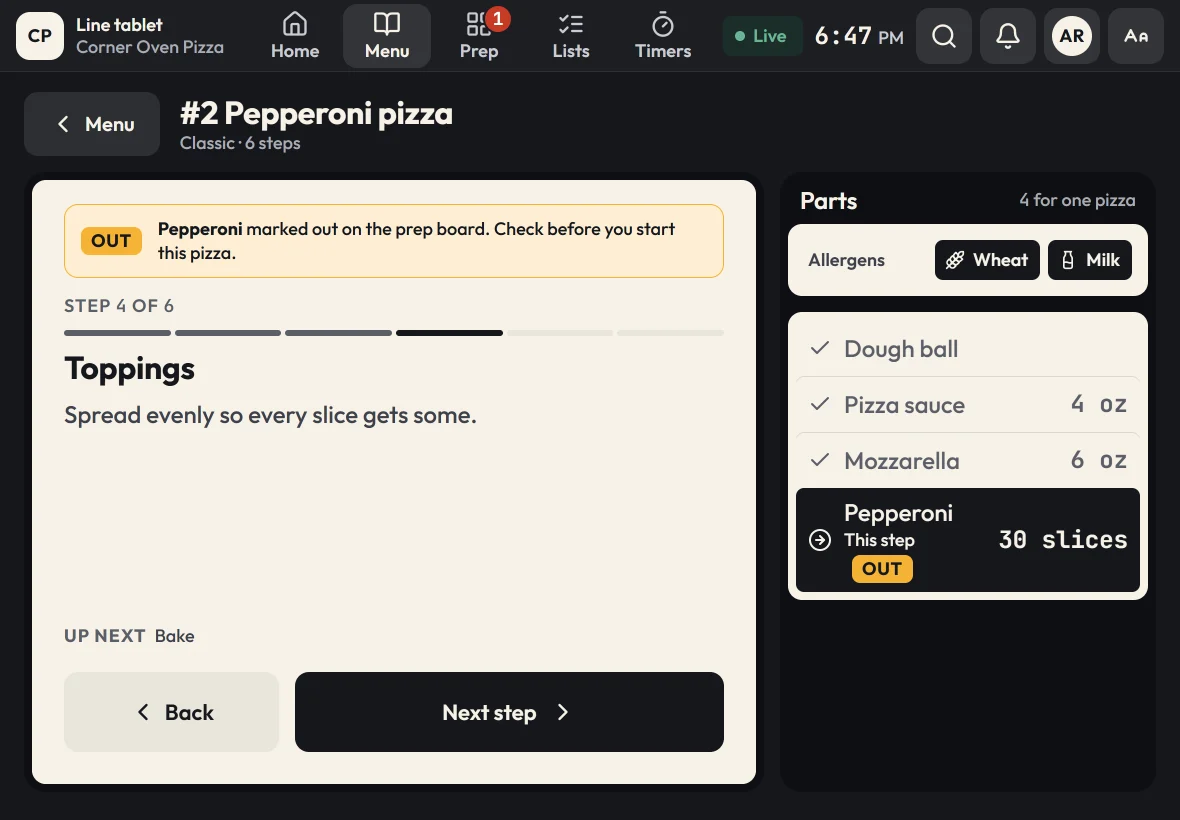
Kitchen software for a pizza restaurant keeps every pie consistent and the make line stocked. Zatila gives cooks a step-by-step guide for each pizza, from stretching the dough to cutting the slices, with the portion of every part for each size; a live prep board for dough balls, sauce, cheese and toppings; use-by labels for every prepped container; and checklists for opening, line checks and closing.
- Pizza guides
- Stretch, sauce, cheese, toppings, bake, finish and cut
- Portions
- Ounces or slices for every part, for each size
- Sizes
- Like 10, 14 and 18 inch, on one pizza
- Prep board
- Dough, sauces, cheese and toppings, by station
- Labels
- Use-by dates for dough trays and prepped toppings
The problem
What goes wrong in a busy pizza kitchen
Pizza looks simple until it's Friday night with three new hires on the make line.
Cheese and toppings creep up
A heavy hand on mozzarella or pepperoni costs a little on each pie and a lot each month. Without portions at the make line, every cook has their own idea of enough.
Dough runs out mid-rush
Dough needs time. If nobody notices the trays are low until the rush, there's no fixing it that night.
New hires learn by guessing
Specialty pies and white pizzas trip up new cooks. A poster on the wall can't show the steps in order or the amount for each one.
How Zatila handles it
How Zatila runs a pizza kitchen
Guides at the make line, the board at prep, and labels on every container.
Make-line prep
Dough, sauce, cheese and toppings at a glance.
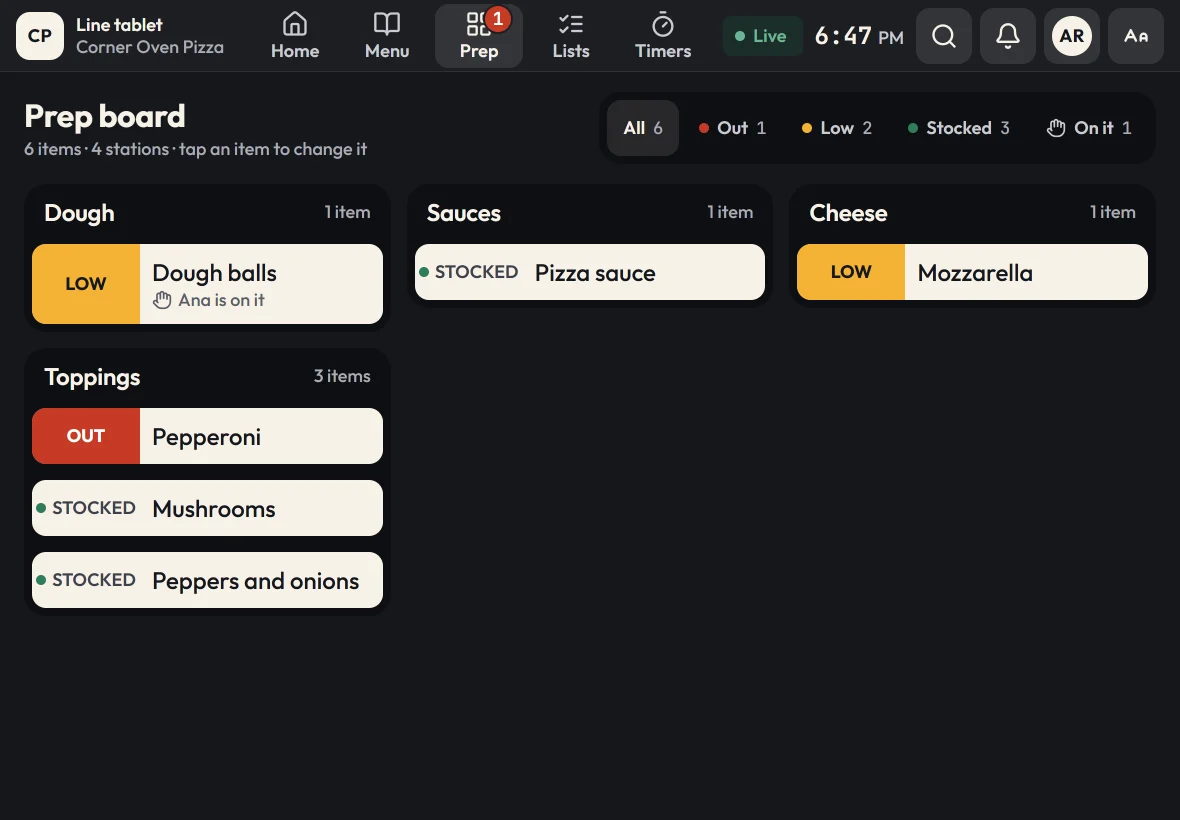
The prep board groups items by station: dough, sauces, cheese and toppings. Cooks mark items stocked, low or out as they work, and "I'm on it" shows who is rolling the next tray of dough balls. When pepperoni runs out, every pizza guide that uses it says so on its step.
- Dough balls with a par for each weekday, so Friday preps more than Tuesday
- One board per location, live on every tablet
- Out items flagged inside the guides
Labels and shelf life
Dough trays and toppings, dated.
Each prep item keeps its shelf life, like dough balls within 3 days or sliced mushrooms within 3. Print a use-by label when the container is made, and the Labels screen shows what to use today and what to throw out.
More on prep lists and labels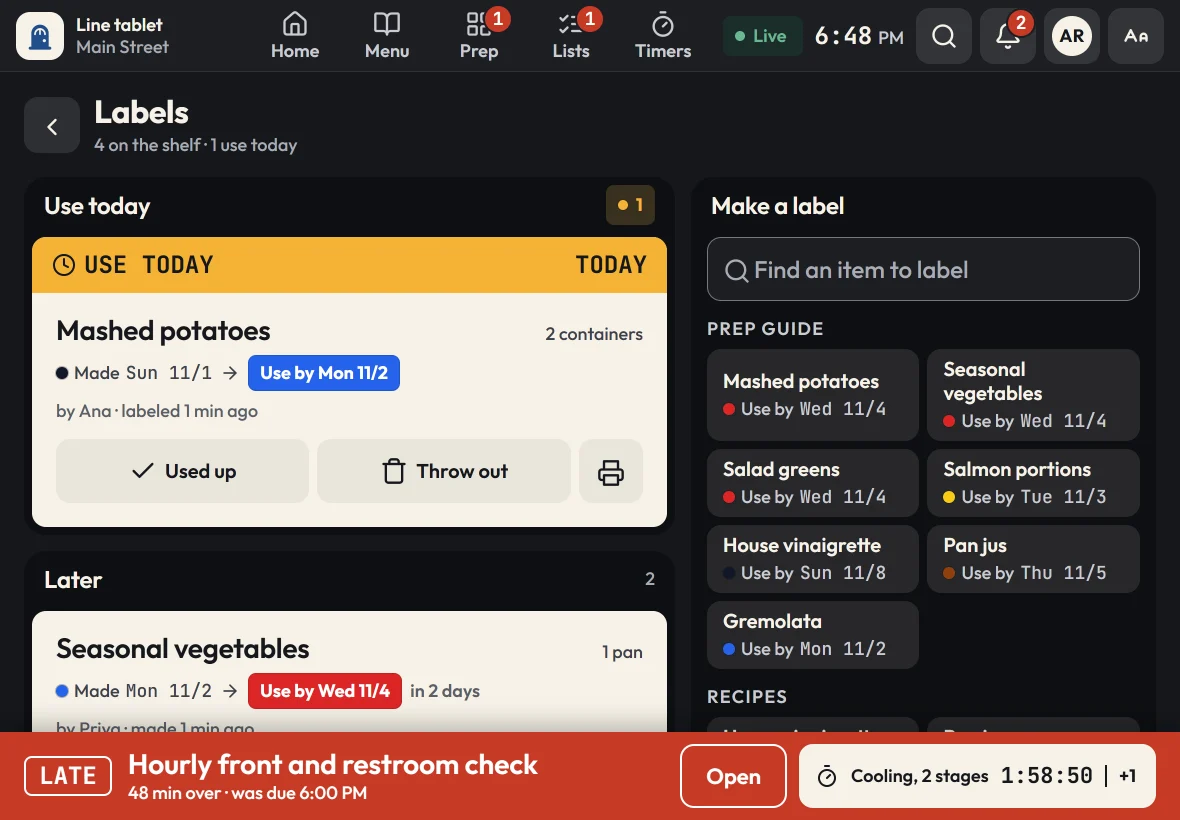
Set up for you
Your build chart, turned into guides.
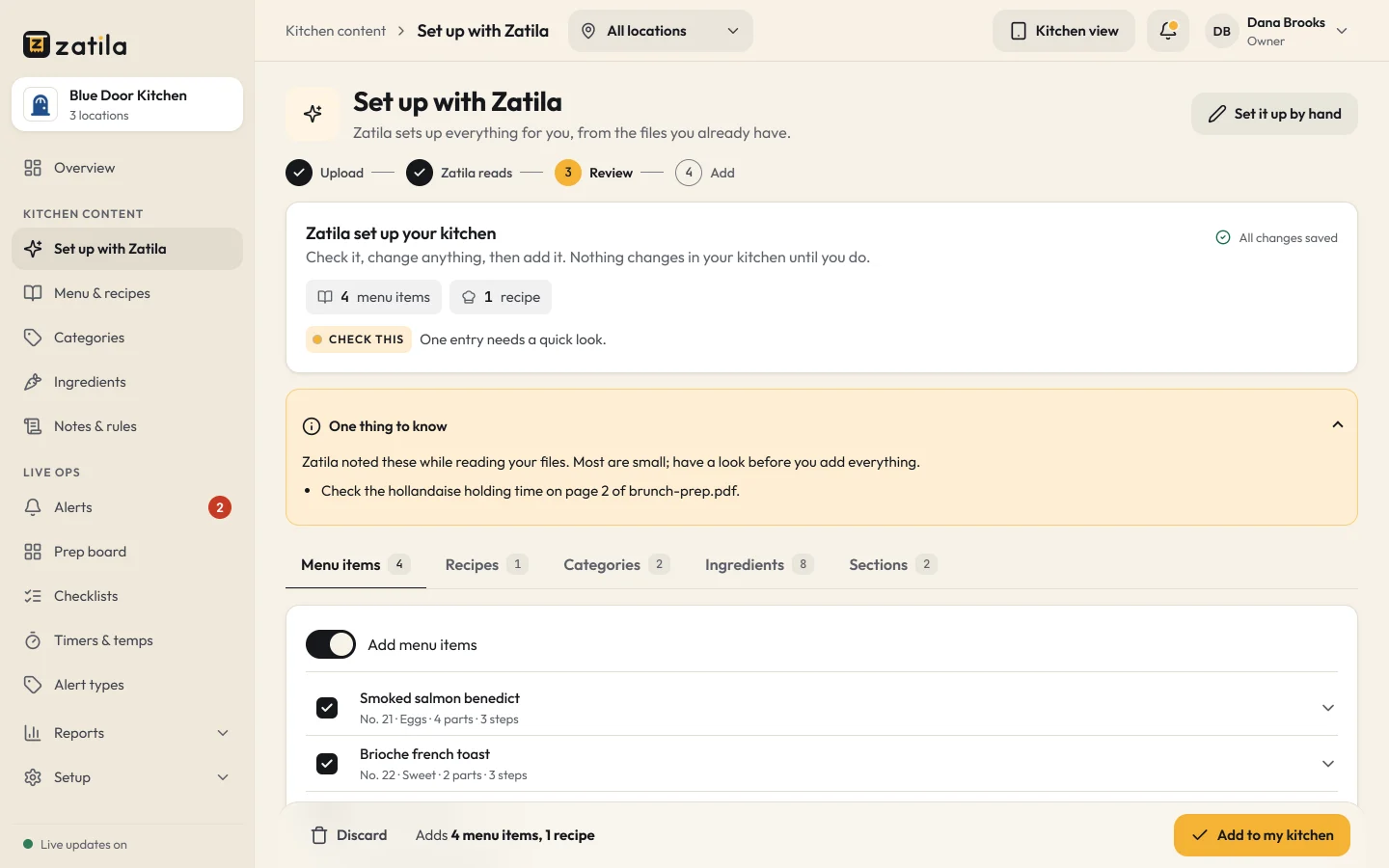
Upload your menu, spec sheets or a photo of the build chart. Zatila sets up each pizza's parts and steps, your sauce and dough recipes and the prep board, as a draft for you to check. Choose Pizza at sign-up and you start with example pizzas, prep items and a sauce recipe you can change.
- PDFs, photos, Word, Excel and text files
- Nothing reaches the line until you approve it
Sizes
Small, medium or large, each with its own portions.
Give a pizza its sizes, like 10, 14 and 18 inch, and set each part's amount for each one. The cook taps the size on the tablet, and the parts list and every step of the guide show that size's dough, sauce, cheese and toppings, so a large never goes out with a medium's cheese.
More on menu guides and sizes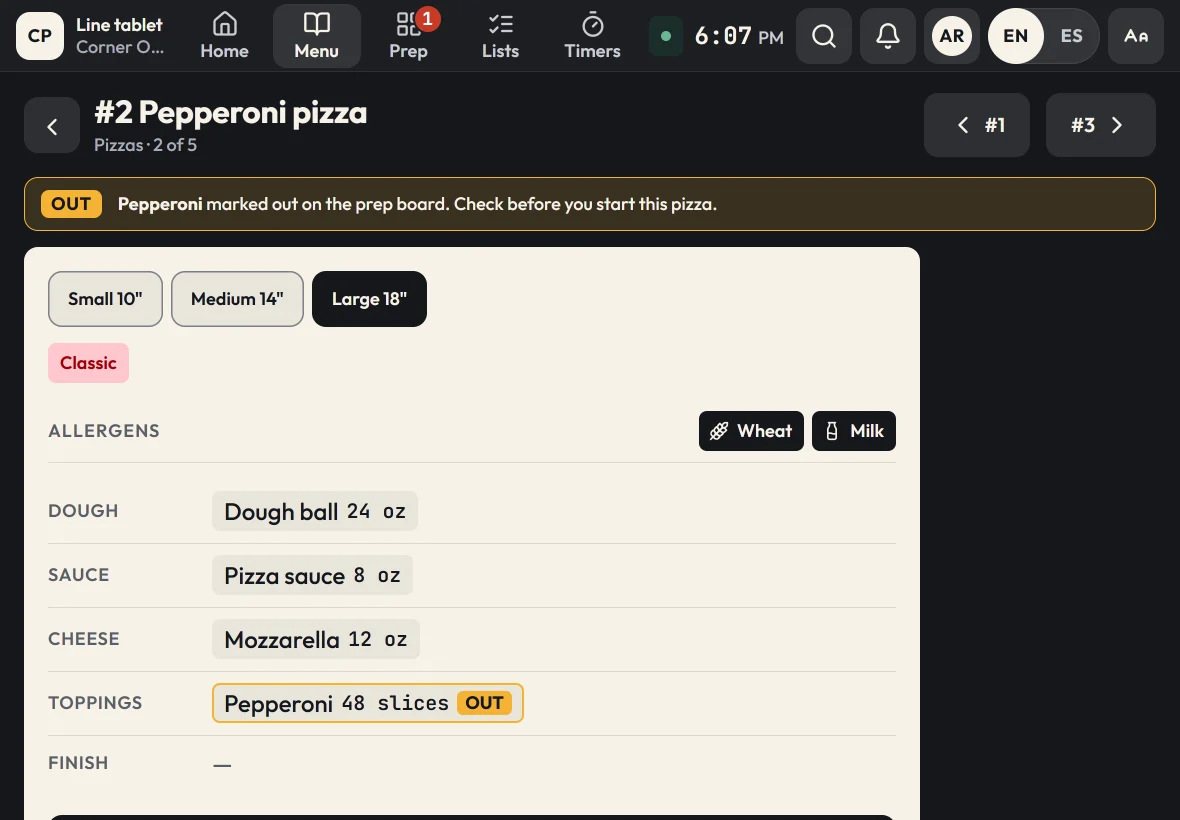
How it works
Get your pizza kitchen on Zatila
- 01
Choose Pizza at sign-up
Start with example pizzas, prep items, a pizza sauce recipe and a prep board laid out by station.
- 02
Upload your own menu
Zatila sets up your pies, portions and steps from your files for you to review.
- 03
Pair the tablets
One at the make line, one at prep, one by the oven. Unlimited tablets on every plan.
- 04
Run service
Cooks follow the guides, update the board and print labels; you see it all from the admin.
How do I keep pizza toppings consistent?
Portion every part and show it the moment the cook needs it. Zatila's pizza guides list each part with its amount, like 6 oz of mozzarella or 30 slices of pepperoni, and highlight the parts for the current step.
Can one pizza come in different sizes?
Yes. Give a pizza sizes like 10, 14 and 18 inch, and each part its amount for each size, like 4, 6 and 9 oz of mozzarella. The cook picks the size, and the guide shows that size's portions on every step.
Can I track dough on the prep board?
Yes. Make dough balls a board item with a par, and give busy days their own, like more on Friday and Saturday, so the line marks them low before they run out, with the dough prep guide one tap away.
Does Zatila work for a pizza shop with one location?
Yes. Starter is built for one kitchen getting organized, and every plan has every kitchen tool and unlimited tablets.
Can my crew use the tablets in Spanish?
Yes. Tap EN | ES on any tablet and it switches to Spanish, with every amount exactly as you set it. Zatila translates your own pizzas, prep and checklists into kitchen Spanish, and you can review and change any translation in the admin. Records and reports stay in English.
Does it replace my POS?
No. Zatila runs your kitchen's guides, prep, labels and checks. It doesn't take orders, so it works alongside whatever POS and ticket printer you use today.
Can I print labels for dough trays?
Yes. Labels print from the tablet with the item, the made date, the use-by date and who made it.
Pricing
Pizza kitchen software, priced per location.
Every plan has every kitchen tool and unlimited tablets, and coming soon and closed locations are free.
Starter
For one kitchen getting organized.
$39per location
/ month$35 from the 5th location, $29 from the 10th
Start free$390per location
/ year$32.50 a month, billed yearly. $350 from the 5th location, $290 from the 10th
- Menu guides, recipes and the prep guide
- Prep board, checklists and use-by labels
- Food-safety timers with temperature logs
- Unlimited tablets
- Zatila sets up 50 items a month for you
Recommended
Pro
For busy kitchens and growing teams.
$69per location
/ month$59 from the 5th location, $49 from the 10th
Start free$690per location
/ year$57.50 a month, billed yearly. $590 from the 5th location, $490 from the 10th
- Everything in Starter
- Zatila sets up your whole menu, with no monthly limit
Chain
For groups with 10 or more locations.
Talk to usCustom
- Everything in Pro
- Setup help for every location
- Custom terms and invoicing
Coming soon and closed locations are free.
30-day free trial, no card.
Prices in US dollars. Tax is added where it applies.
Keep reading