
For burger restaurants
Kitchen software for burger restaurants.
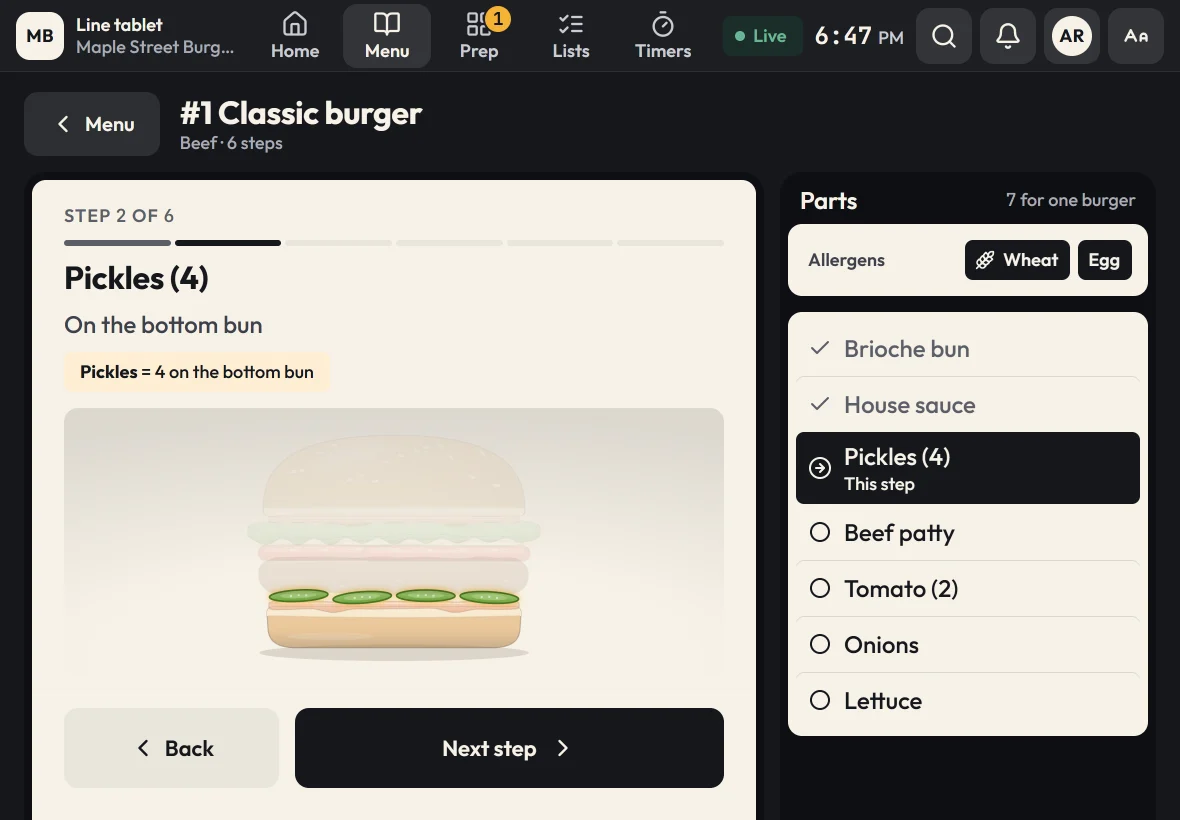
Zatila shows every burger as it's built: bun, sauce, pickles, patty, cheese and toppings, layer by layer, with the count for each part. Add a live prep board, use-by labels and line checks that come due on time, and the grill runs the same way on every shift.
30-day free trialNo card neededUnlimited tablets
What does kitchen software do for a burger restaurant?
For a burger restaurant, kitchen software keeps builds consistent and the line stocked during the rush. Zatila draws each burger as a layered stack on the tablet, one step at a time, with the count for each part, like 4 pickles on the bottom bun. Single and double are sizes of the same burger, each with its own counts. It also runs a live prep board for patties, sauces and toppings, prints use-by labels, logs cook temperatures and brings up line checks on schedule.
- Build guides
- Each layer drawn in order
- Counts
- Pickles, slices and sauce for each part, single or double
- Allergens
- At the top of every build
- Training
- Flashcards and a quiz from your own menu
The problem
Where burger builds go wrong
A burger has a dozen parts and a ticket time measured in minutes. Small misses add up fast.
Builds drift between shifts
Sauce on the top bun at lunch, the bottom at dinner. Guests notice, especially the regulars who order the same thing every week.
Allergens get lost in the rush
A guest with an egg or dairy allergy needs the cook to know what's in the bun and the sauce. An allergen sheet in the office is no help at the grill.
Training takes your best cook off the line
Every new hire shadows someone for days. That's your fastest grill cook teaching instead of cooking.
How Zatila handles it
How Zatila runs a burger line
The build at the grill, the board at prep, and the checks on time.
Prep board
Patties, sauces and toppings, live.
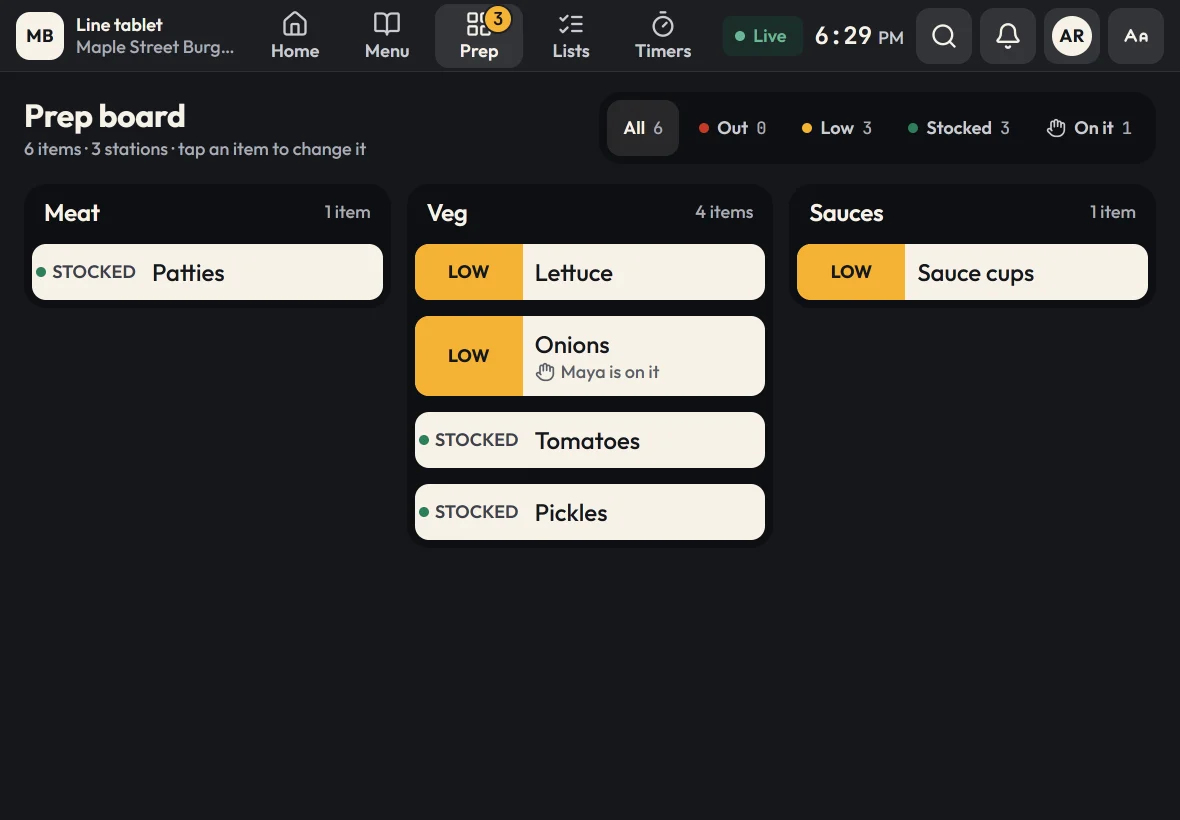
The prep board groups what the line needs by station: meat, veg and sauces. Cooks mark items low or out the moment they see it, claim what they're prepping, and every tablet updates within seconds. When an item is out, every build that uses it says so.
- Counts against par for patties and sauce cups
- "I'm on it" so two cooks never slice the same tomatoes
- A filter for what needs prep, for the next shift
Labels and food safety
Sauces and toppings, dated. Temperatures, logged.
House sauce, sliced onions and shredded lettuce each keep their own shelf life, and a use-by label prints in two taps. Recipes can carry a cook-to temperature with a Log temp button, and cooling timers ask for the reading when each stage ends. Grill and fryer line checks can ask for readings too, like a patty's internal temperature, and a reading out of range needs a corrective action.
See food-safety timers and logs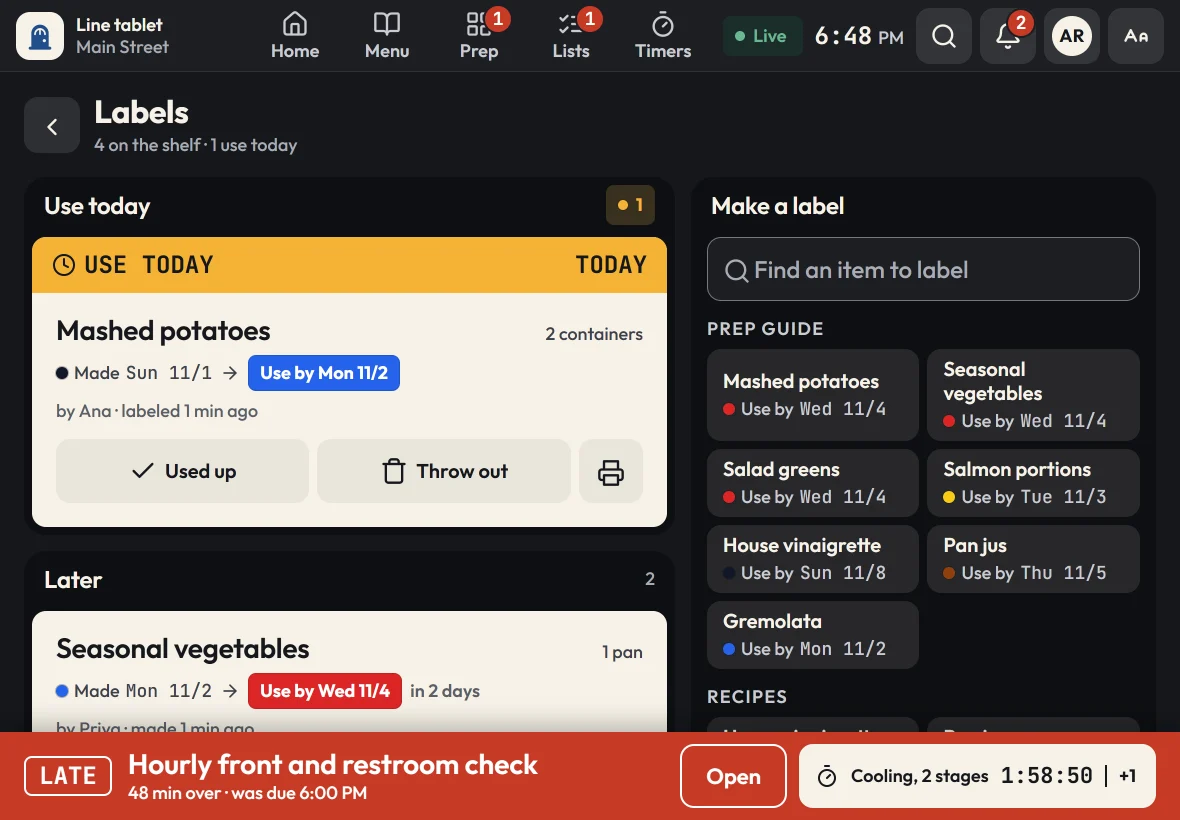
Menu editor
Change a build once. Every grill has it.
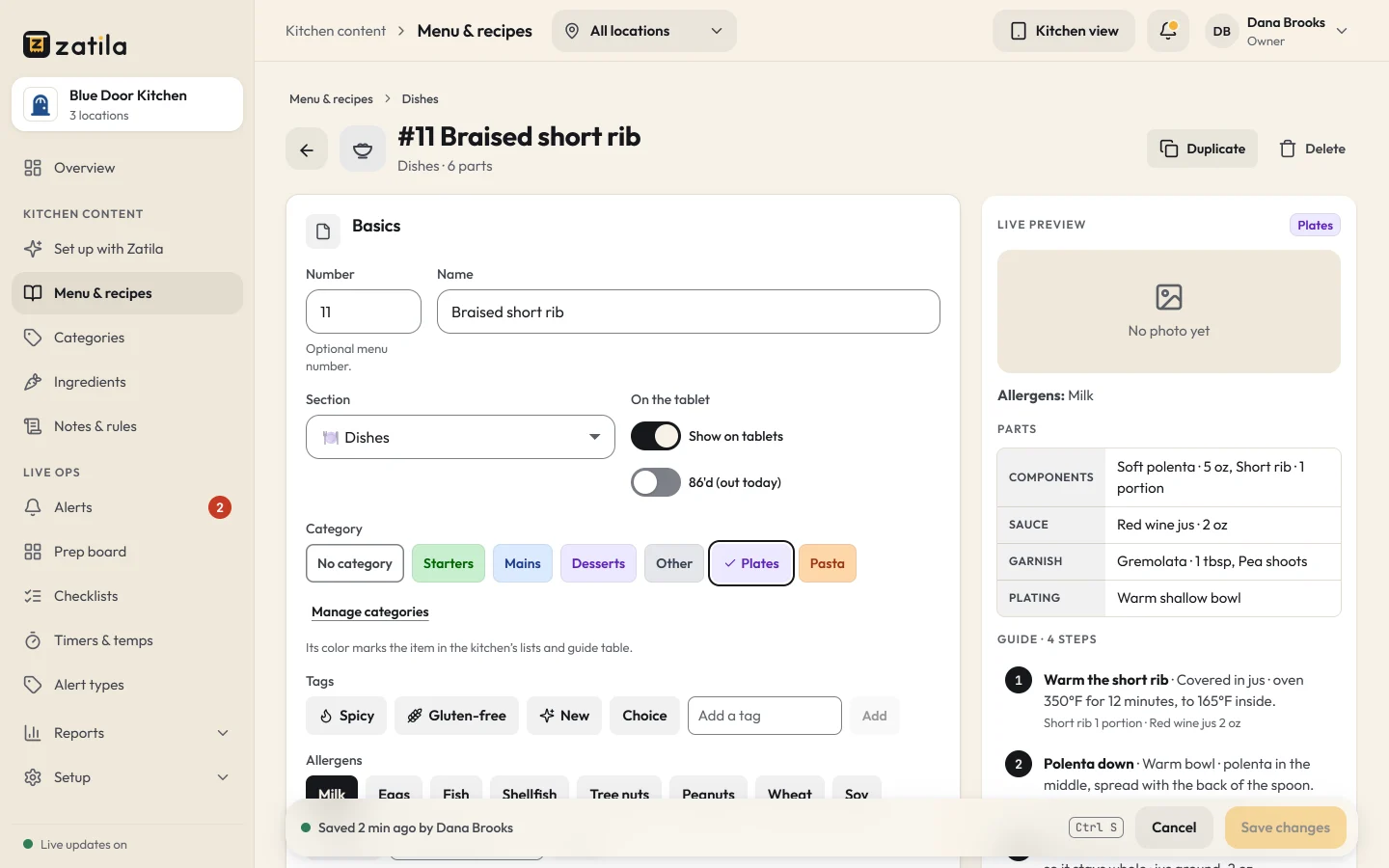
Add a limited-time burger or change the sauce on a classic in the admin, with a live preview of the build. Save it, and every tablet in every location has the new version within seconds. Need to pull an item for the night? 86 it with one switch.
How it works
Get your burger line on Zatila
- 01
Choose Burgers and sandwiches
Start with example burgers drawn as build stacks, prep items, a house sauce recipe and a prep board.
- 02
Upload your menu
Zatila sets up each build with its parts, counts and allergens from your menu and spec sheets.
- 03
Train the team
New cooks practice the builds with flashcards and a quiz made from your menu.
- 04
Run the line
Guides at the grill, the board at prep, line checks on schedule.
How do I keep burger builds consistent across shifts?
Show the build at the station, one layer at a time, with the count for each part. Zatila draws each burger as a stack and marks the part for the current step, so every cook builds it the same way.
Can I set up single and double burgers?
Yes. Make single and double sizes of one burger, and give each part its count for each size, like 1 or 2 patties and 1 or 2 slices of cheese. The cook picks the size, and the build shows that size's stack and counts.
What temperature should burgers be cooked to?
The FDA Food Code calls for ground beef to reach 155°F for 17 seconds and poultry 165°F; your local health code may differ. In Zatila, set a cook-to temperature on a recipe and cooks log the reading with their name.
Does it work for sandwiches and chicken too?
Yes. The Burgers and sandwiches type covers beef, chicken, plant-based and other items, and you can rename sections, groups and words to fit your menu.
Do the tablets work in Spanish?
Yes. One tap on EN | ES switches a tablet to Spanish, and each tablet remembers its choice. Zatila translates your own builds, prep and checklists into kitchen Spanish, every count and temperature stays as you wrote it, and you can change any translation in the admin. Records and reports stay in English.
Do cooks need their own accounts?
No. Each tablet is paired to its location once, and cooks sign checks, labels and temperatures with their name. Staff PINs are there if you want them.
How long does setup take?
Most kitchens are ready in an afternoon. Upload your menu and spec sheets, review what Zatila sets up, and pair your tablets.
Pricing
Burger kitchen software, priced per location.
Every plan has every kitchen tool, training included, with unlimited tablets. Coming soon and closed locations are free.
Starter
For one kitchen getting organized.
$39per location
/ month$35 from the 5th location, $29 from the 10th
Start free$390per location
/ year$32.50 a month, billed yearly. $350 from the 5th location, $290 from the 10th
- Menu guides, recipes and the prep guide
- Prep board, checklists and use-by labels
- Food-safety timers with temperature logs
- Unlimited tablets
- Zatila sets up 50 items a month for you
Recommended
Pro
For busy kitchens and growing teams.
$69per location
/ month$59 from the 5th location, $49 from the 10th
Start free$690per location
/ year$57.50 a month, billed yearly. $590 from the 5th location, $490 from the 10th
- Everything in Starter
- Zatila sets up your whole menu, with no monthly limit
Chain
For groups with 10 or more locations.
Talk to usCustom
- Everything in Pro
- Setup help for every location
- Custom terms and invoicing
Coming soon and closed locations are free.
30-day free trial, no card.
Prices in US dollars. Tax is added where it applies.
Keep reading