
Menu guides and recipes
Recipe guides your line cooks can follow.
Zatila turns your recipe cards and build sheets into step-by-step guides on the kitchen tablet: one step per screen in big type, the parts and amounts for that step, the allergens at the top, and a photo when you add one.
30-day free trialNo card neededUnlimited tablets
What is a recipe guide for line cooks?
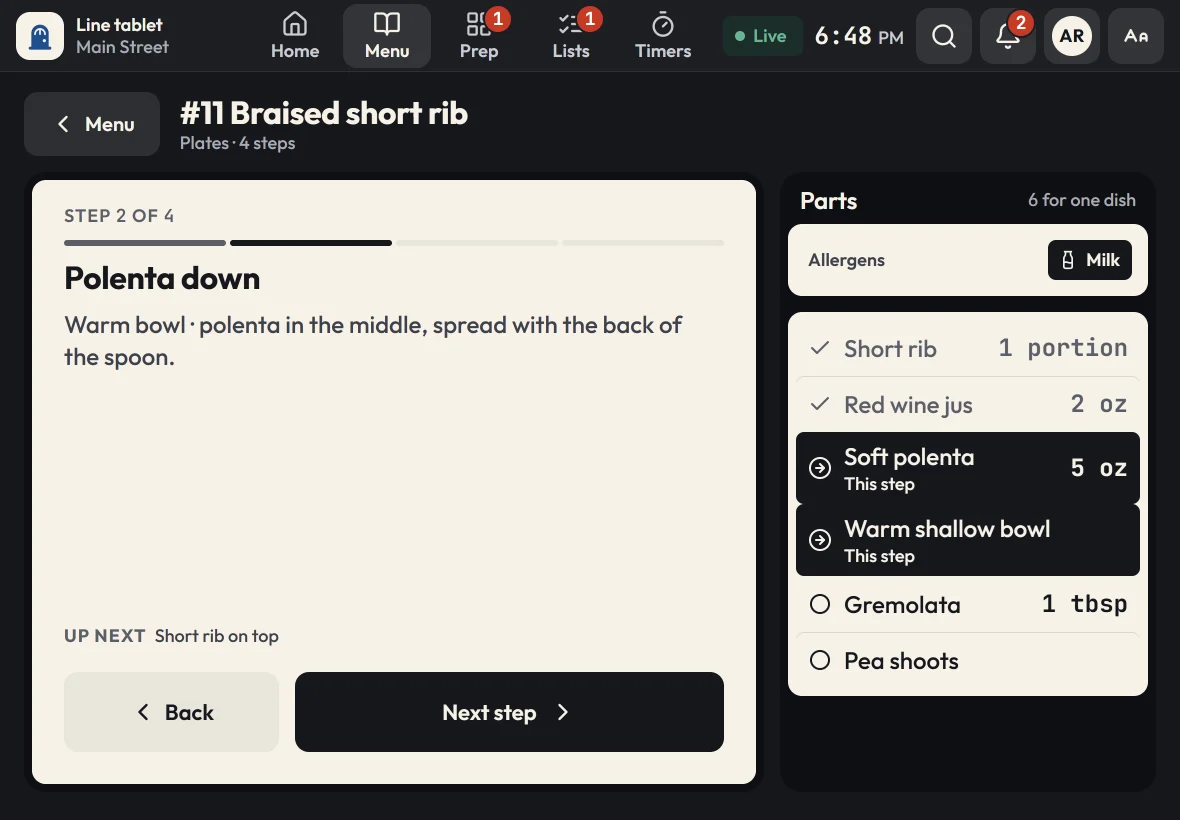
A line cook recipe guide shows how to make a menu item one step at a time, at the station, during service. Instead of a binder or a poster, each Zatila guide puts a single step on the tablet with the exact parts and amounts for that step, any timer it needs and the item's allergens. New cooks learn the menu faster, and every plate comes out the way you designed it.
- One step per screen
- Big type, readable at arm's length
- Parts per step
- The amounts for this step, marked in the parts list
- Allergens
- At the top of every guide, and a chart of the whole menu
- Sizes
- Up to 6 per item, each with its own portions
- Recipes
- A batch scaler from ½ to 4 batches, or any amount
The problem
Why consistency breaks down on the line
Your recipes are fine. Getting them from the office to the station, every shift, is the hard part.
The binder lives in the office
Recipe binders and laminated posters go out of date the day you change the menu, and nobody stops mid-ticket to flip through one.
Every cook learns a different version
Training happens by shadowing whoever works that night. Small changes stack up until the same dish looks different on every shift.
Allergens get missed
When the allergen list is a separate sheet, it's the first thing skipped when tickets pile up.
How Zatila handles it
How Zatila guides every dish
The same guide on every tablet, written once by you and changed in one place.
Menu-item guides
The right part, at the right step.
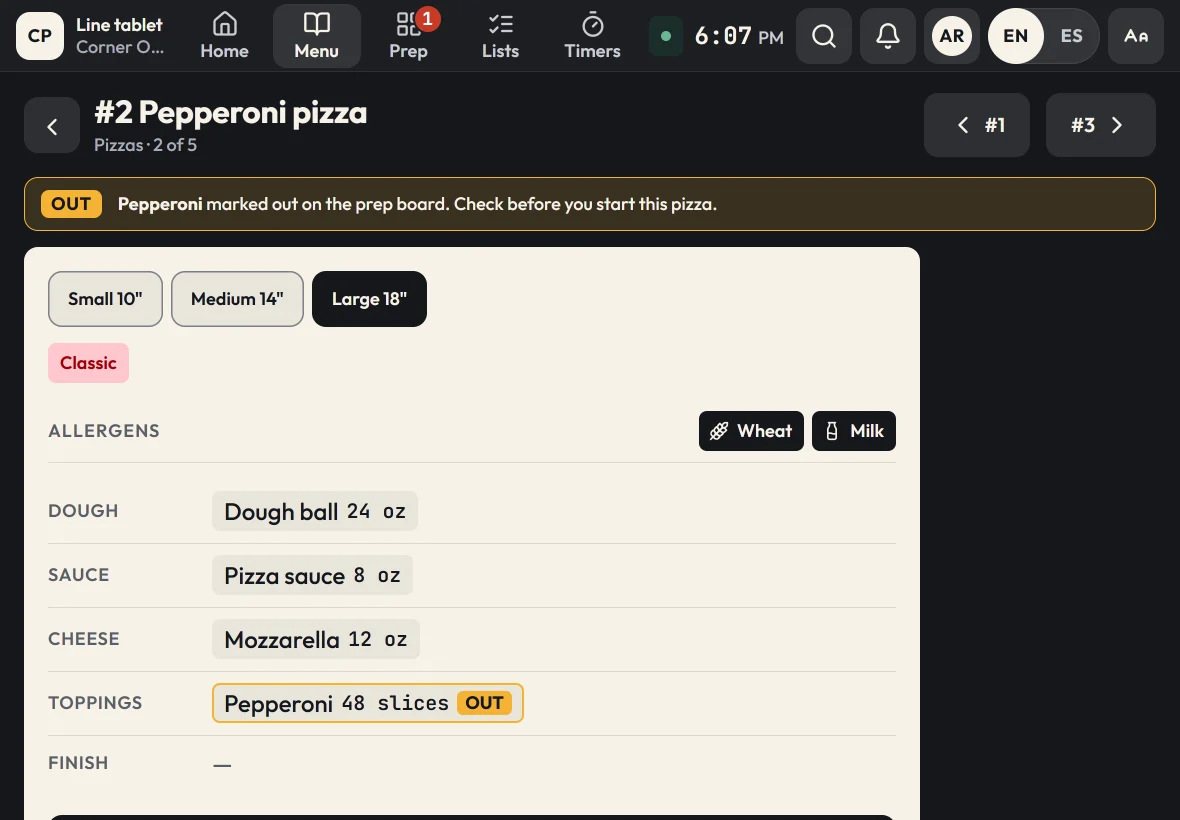
Each step shows only what the cook needs now: the instruction, the parts and amounts for that step and what comes next. Burger and sandwich menus draw the build as a layered stack, so the cook sees exactly where each part goes. An item with sizes, like a 10, 14 or 18 inch pizza or a single or double burger, shows the parts and amounts for the size the cook picks.
- The current part highlighted in the parts list
- Timers built into the steps that need them
- Sizes, each with its own amount of every part
- An allergen chart for the whole menu, on the tablet and printed
- Out of an ingredient? Every step that uses it says so
Recipes
Batch recipes with a scaler.
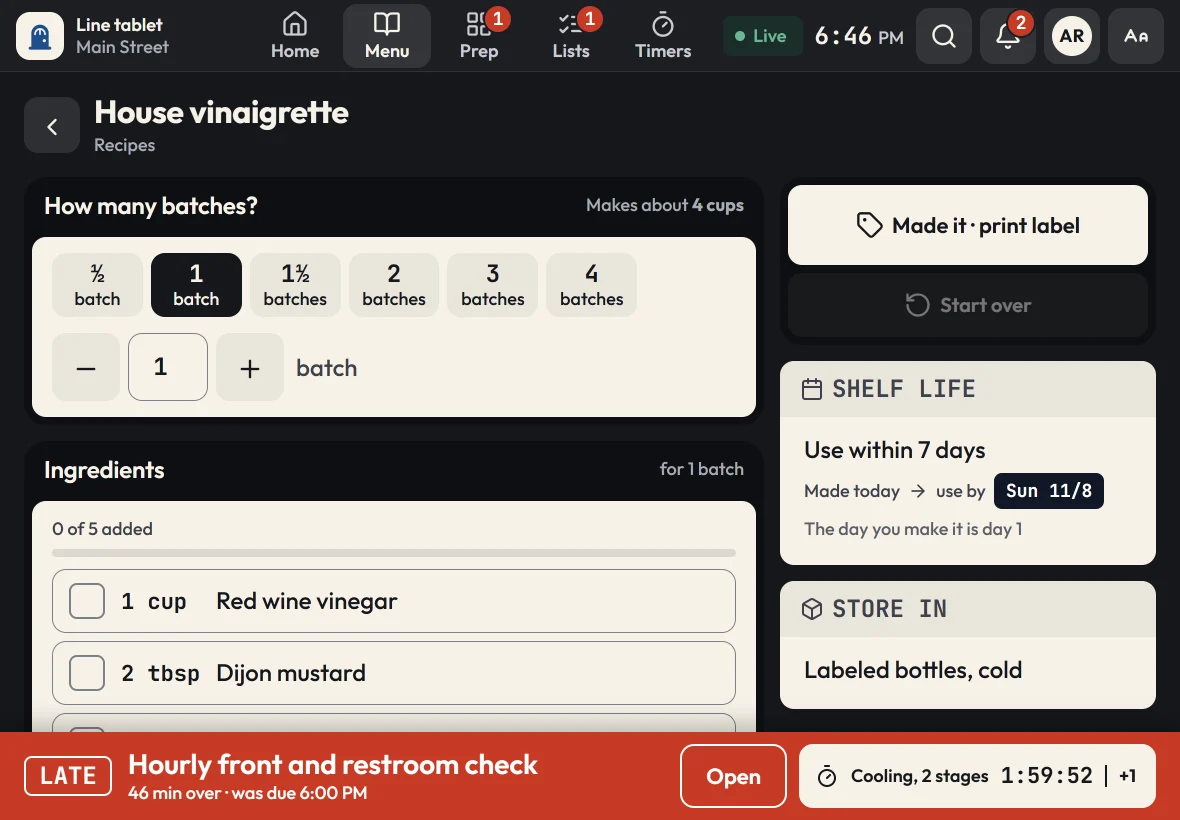
Sauces, dressings and doughs live next to the menu. Pick ½, 1, 1½, 2, 3 or 4 batches, or type any amount, and every ingredient updates. Cooks tick ingredients off as they go, then print a use-by label when they're done.
- Yield, storage and shelf life on every recipe
- Cook-to temperatures with a Log temp button
- Tick-off ingredients, so nothing goes in twice
Menu editor
Change it once. Every tablet has it.
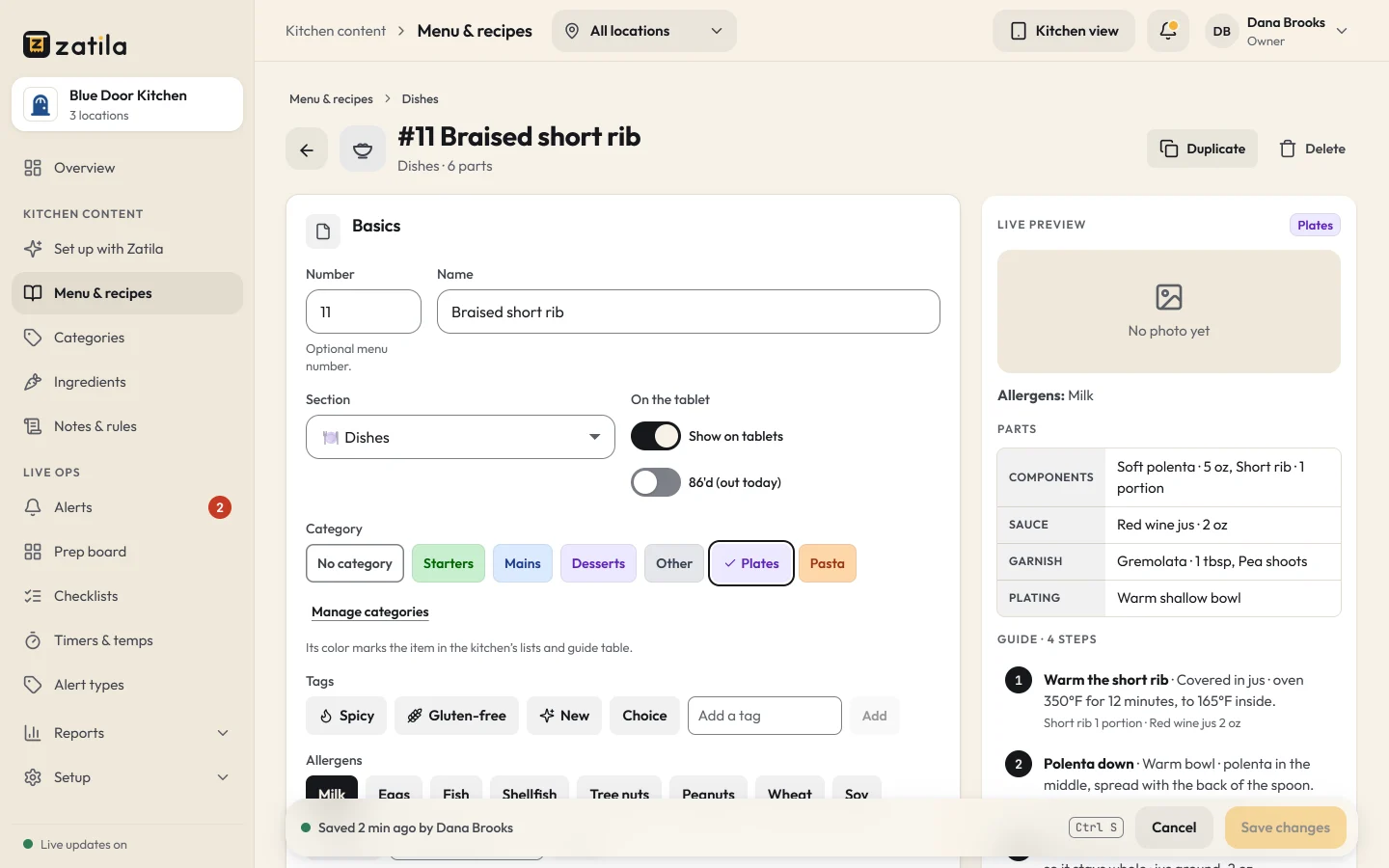
Edit a guide in the admin with a live preview of what the line will see. Save it, and every tablet in every location has the new version within seconds. Pulling a dish for the night? 86 it with one switch.
Zatila setup
Your recipe cards, set up for you.
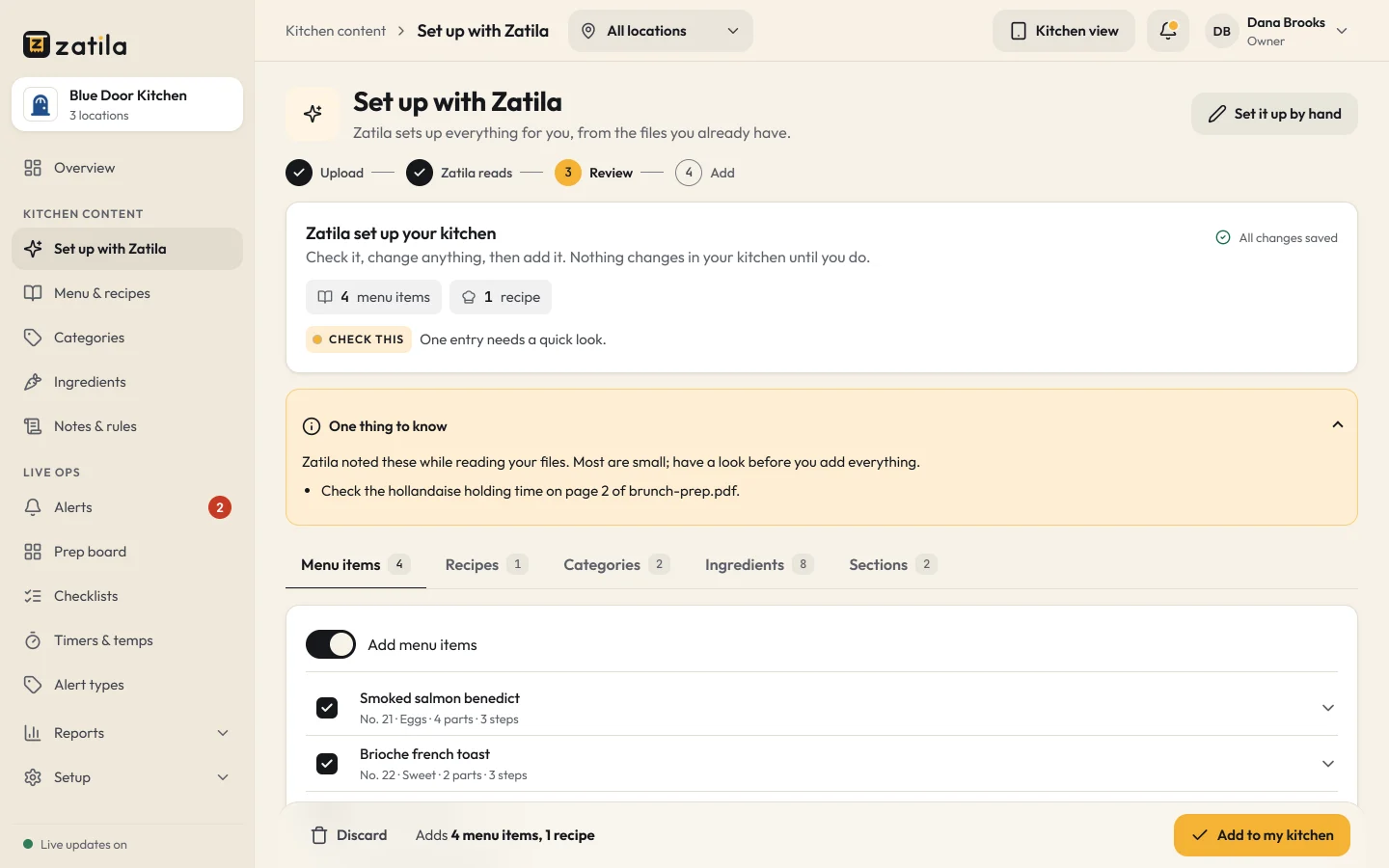
Upload PDFs, photos, Word, Excel or text files, up to 20 at a time. Zatila copies your menu items, steps and recipes into a draft for you to review. It never changes your recipes, and nothing reaches the line until you approve it.
- Anything unclear is marked for a second look
- Starter sets up 50 items a month for you; Pro has no monthly limit
How it works
From recipe cards to guides on the line
- 01
Upload your recipes
Recipe cards, build sheets, spec photos, even a picture of the whiteboard.
- 02
Review the guides
Check each step, part and allergen, add photos if you like, and approve.
- 03
Cook from the tablet
Cooks open a dish from the menu or search and follow it step by step.
- 04
Train with it
Flashcards and a quiz built from your own menu help new cooks learn the builds.
How do I make recipes easy for line cooks to follow?
Break each dish into short steps, show only the parts needed for the current step, put the amounts next to them, and keep the guide at the station. That's how Zatila's guides work: one step per screen in large type, readable at arm's length.
Can I add photos to the steps?
Yes. Add a photo to any step in the admin and cooks see it on that step. Burger and sandwich menus also get a drawn build stack that shows where each part goes.
Can one menu item come in different sizes?
Yes. Give an item up to 6 sizes, like 10, 14 and 18 inch pizzas, 8, 12 and 16 oz drinks, or a single and a double burger. Each part has its own amount for each size, and the guide shows the parts and amounts for the size the cook picks. The steps stay the same for every size.
Does Zatila change my recipes?
No. Zatila copies your recipes from your files as written, marks anything it couldn't read clearly, and you review everything before your team sees it.
How do new cooks learn the menu?
Beyond the guides, the tablet has flashcards and a quiz made from your own menu items, with a score and a best result for each person, so new cooks can practice between tickets.
Can cooks search for a recipe?
Yes. One search box covers guides, menu items, recipes, prep items, checklists and the prep board, and it matches by name, number, ingredient or allergen.
Pricing
Guides and recipes on every plan.
Every plan includes menu guides, recipes, training and unlimited tablets. Starter sets up 50 items a month for you; Pro has no monthly limit.
Starter
For one kitchen getting organized.
$39per location
/ month$35 from the 5th location, $29 from the 10th
Start free$390per location
/ year$32.50 a month, billed yearly. $350 from the 5th location, $290 from the 10th
- Menu guides, recipes and the prep guide
- Prep board, checklists and use-by labels
- Food-safety timers with temperature logs
- Unlimited tablets
- Zatila sets up 50 items a month for you
Recommended
Pro
For busy kitchens and growing teams.
$69per location
/ month$59 from the 5th location, $49 from the 10th
Start free$690per location
/ year$57.50 a month, billed yearly. $590 from the 5th location, $490 from the 10th
- Everything in Starter
- Zatila sets up your whole menu, with no monthly limit
Chain
For groups with 10 or more locations.
Talk to usCustom
- Everything in Pro
- Setup help for every location
- Custom terms and invoicing
Coming soon and closed locations are free.
30-day free trial, no card.
Prices in US dollars. Tax is added where it applies.
Keep reading