
Prep lists and the prep board
A prep list that keeps up with the rush.
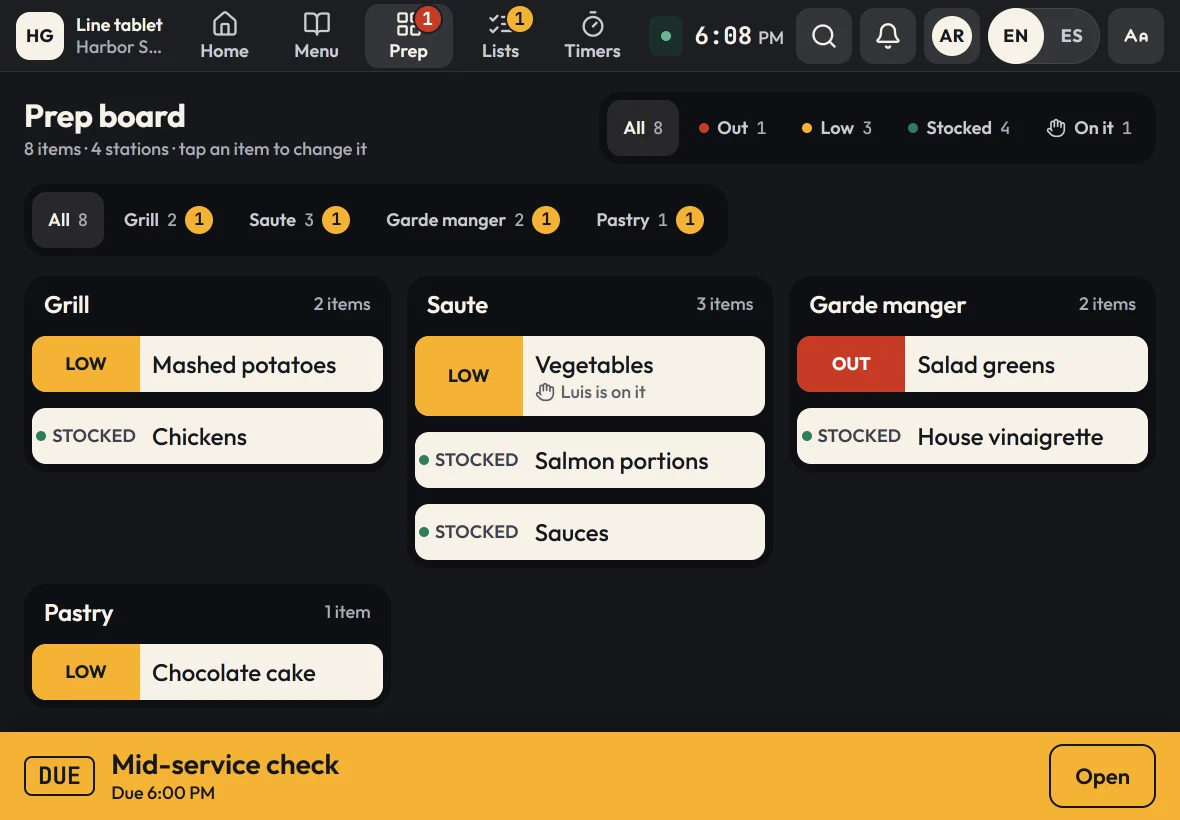
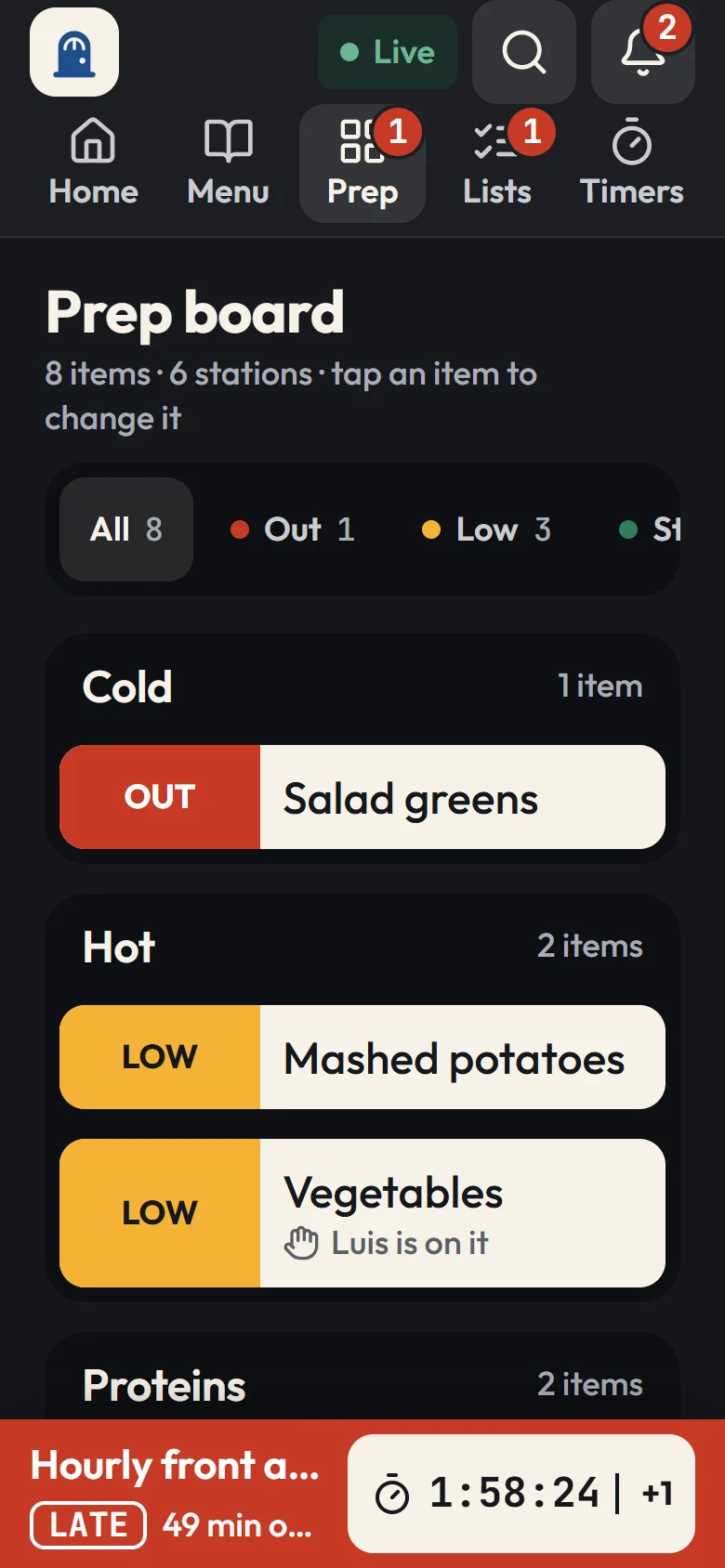
Zatila's prep board shows every station's items as stocked, low or out, or as a count against par, live on every tablet in the location. What needs prep rises to the top, and the cook who takes it says so.
30-day free trialNo card neededUnlimited tablets
What is a restaurant prep list app?
A restaurant prep list app replaces the handwritten prep sheet with a shared, live list on a tablet or phone. In Zatila, the prep list is the prep board: each item belongs to a station and reads stocked, low or out, or a count like 3 of 4 against its par. Cooks update it as they work, every tablet in the location shows the change within seconds, and each item links to how to prep it and how long it keeps.
- Status
- Stocked, low or out, or a count against par
- Pars
- A different par for any weekday, and for each location
- Who's on it
- "I'm on it" shows who is prepping what
- Prep guide
- How to cut it, what it goes in, how long it keeps
- Devices
- Every tablet in the location, and phones too
The problem
Why the paper prep sheet keeps letting you down
Most prep lists are written once in the morning and wrong by lunch.
It's out of date by noon
The opener writes down what looks low at 9 AM. By the lunch rush, the sheet says nothing about the pico that just ran out or the delivery that came in.
Two cooks prep the same thing
Without a way to claim an item, two people dice onions while nobody touches the sauce. The waste shows up in food cost; the gap shows up on the line.
The next shift walks in blind
The closer can't see what was made or what's left, so the opener counts everything again, or guesses, and dinner starts short.
How Zatila handles it
How Zatila runs prep
One board per location, updated by the people doing the work, with the how-to one tap away.
Live prep board
Low before the rush, not during it.
Tap an item to mark it stocked, low or out, or enter a count. Items that need prep move to the top, and every tablet and phone in the location shows the change within seconds. Filters show only what needs prep, or only one station, so each cook sees their own list.
- Counts against a par, like 3 of 4 pans
- A different par for each weekday, like more dough on Friday and Saturday
- "I'm on it" shows who is prepping what, so nobody doubles up
- When an item is out, every guide step that uses it says so
Prep guides and labels
How to prep it, and how long it keeps.
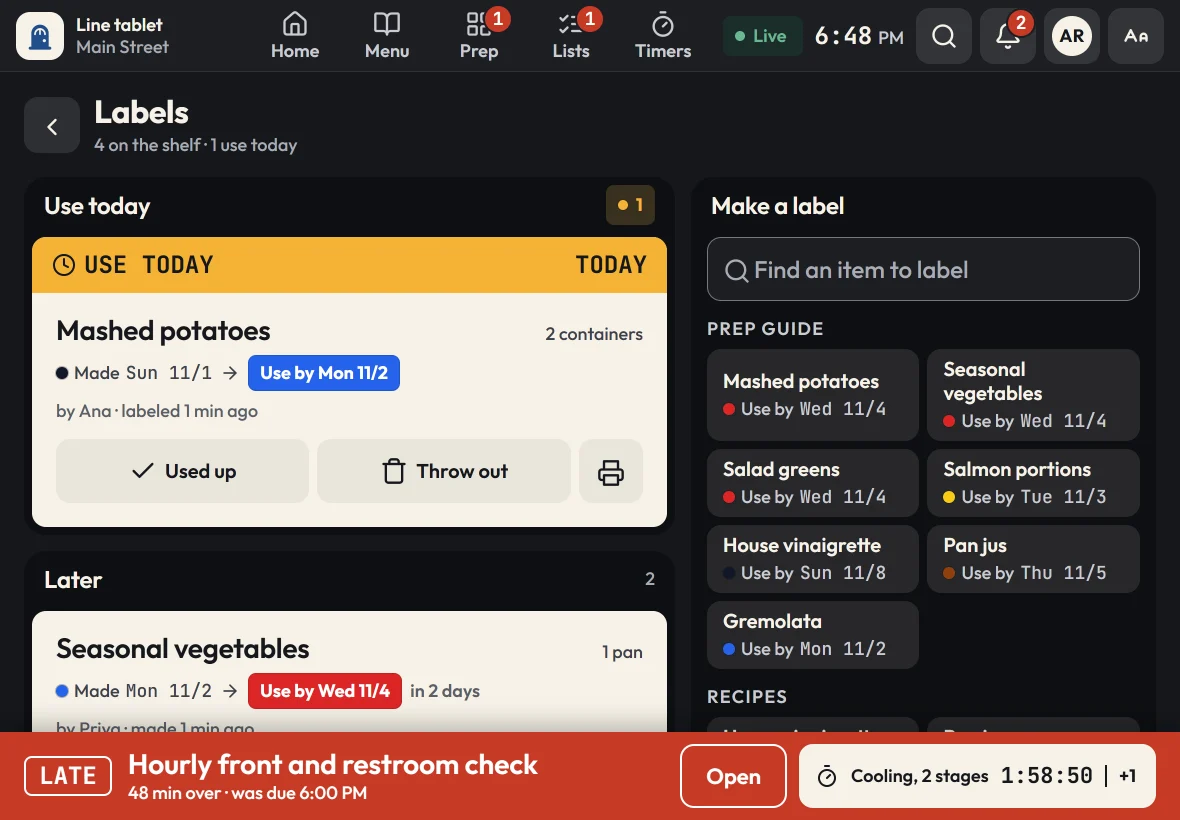
Each prep item carries its own instructions: how to cut it, what container it goes in and its shelf life. When the batch is done, the cook prints a use-by label in two taps, and the Labels screen lists what to use first.
- Shelf life set once per prep item or recipe
- Labels with the made date, use-by date and who made it
- Thrown-out batches are logged as waste
Batch recipes
Scale the batch, not the math.
Board items and prep items can link to a recipe. Pick half a batch or four, and every amount updates. Cooks tick off ingredients as they add them, and the recipe shows the yield, where to store it and the use-by date.
See recipe and menu-item guides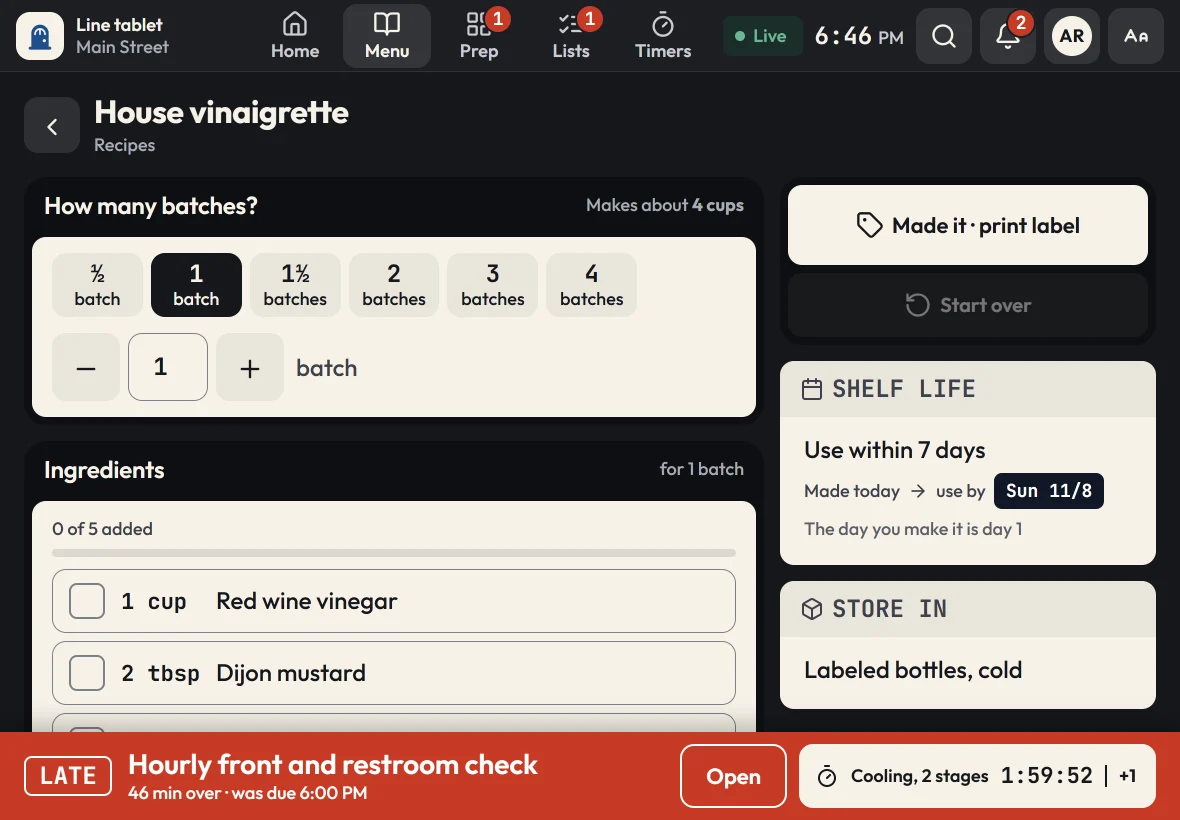
For owners and managers
See what's out at every location.
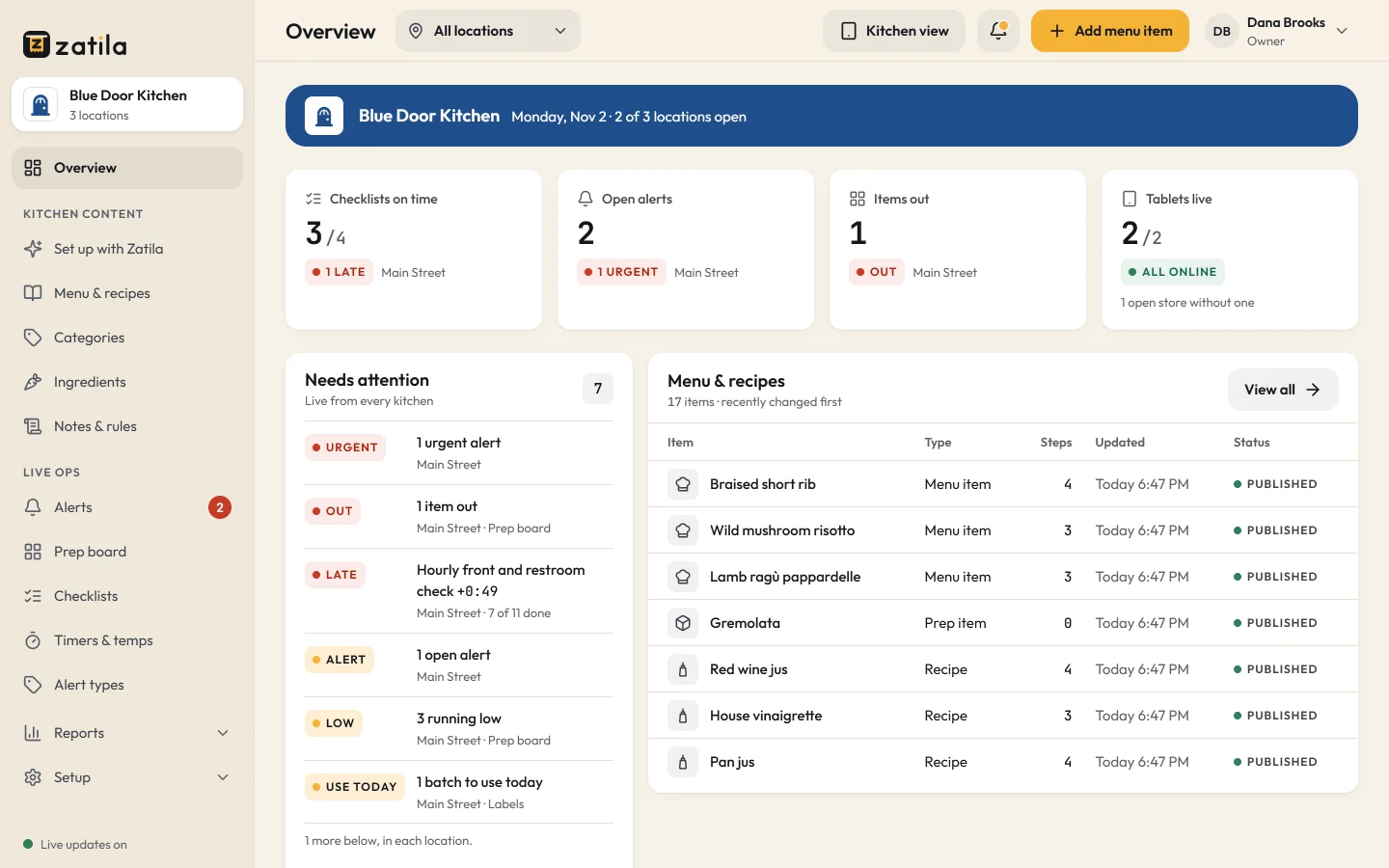
The owner overview shows items out and low across your locations as it happens. The prep board log records what was marked low or out, when and by whom, so you can fix pars with facts instead of guesses.
How it works
From prep sheet to prep board in an afternoon
- 01
Upload your prep sheets
Send the prep lists, par sheets and recipe cards you already use. Zatila sets up the stations, board items, pars and prep guides.
- 02
Review the draft
Check every station and par, change what you like, and add it to your kitchen.
- 03
Pair the tablets
One code per location. Each location gets its own board and shares your menu.
- 04
Prep from the board
Cooks mark what's low, claim what they're prepping and print labels as they finish.
What should be on a restaurant prep list?
Everything the line uses that has to be made ahead: sauces, cut vegetables, portioned proteins, doughs and garnishes. For each item you need a station, a par (how much you want on hand), how to prep it, what it goes in and how long it keeps. Zatila keeps all of that on one board.
How does the prep board know what's low?
Cooks tell it. Tapping an item marks it stocked, low or out, or enters a count against its par. It takes a second, and because every tablet updates live, the whole line works from the same picture.
Can pars change by day of the week?
Yes. Give a board item its own par and low mark for any weekday, like more dough on Friday and Saturday, and each location can have its own too. The board counts against today's par, so low means low for that day.
Can each station see only its own prep?
Yes. The station filter on the tablet shows one station's items, like the grill, the fryer or the bar, while every station still works from the same live board.
Can each location have its own prep board?
Yes. Each location has its own board and its own counts, while sharing your menu, recipes and prep guides. Owners and managers see every location's board from the admin.
Do I have to type the whole prep list in?
No. Upload your prep sheets, par lists or a photo of the whiteboard, and Zatila sets up the board for you as a draft. You can also add and edit items by hand at any time.
Does the prep board work offline?
Yes. Changes made while the Wi-Fi is down are saved on the tablet, with a clear Offline sign, and sync as soon as the connection is back.
Pricing
The prep board is on every plan.
Every plan has every kitchen tool and unlimited tablets, so put one at every prep station. You pay per open location.
Starter
For one kitchen getting organized.
$39per location
/ month$35 from the 5th location, $29 from the 10th
Start free$390per location
/ year$32.50 a month, billed yearly. $350 from the 5th location, $290 from the 10th
- Menu guides, recipes and the prep guide
- Prep board, checklists and use-by labels
- Food-safety timers with temperature logs
- Unlimited tablets
- Zatila sets up 50 items a month for you
Recommended
Pro
For busy kitchens and growing teams.
$69per location
/ month$59 from the 5th location, $49 from the 10th
Start free$690per location
/ year$57.50 a month, billed yearly. $590 from the 5th location, $490 from the 10th
- Everything in Starter
- Zatila sets up your whole menu, with no monthly limit
Chain
For groups with 10 or more locations.
Talk to usCustom
- Everything in Pro
- Setup help for every location
- Custom terms and invoicing
Coming soon and closed locations are free.
30-day free trial, no card.
Prices in US dollars. Tax is added where it applies.
Keep reading