
Food-safety and HACCP logs
Temperature logs your cooks actually keep.
Zatila puts cooling and holding timers, temperature checks and use-by labels on the kitchen tablet. Every reading is saved with the time and the cook's name, so your food-safety records are finished when the shift is.
30-day free trialNo card neededUnlimited tablets
What is a digital food-safety log?
A digital food-safety log is the record of temperature checks, cooling stages and use-by dates that cooks keep on a tablet instead of a paper clipboard. In Zatila, every entry is saved with the reading, the target, pass or fail, the time and the name of the cook who took it. Owners filter the log by date and location, and download it as a CSV file for an inspector or a HACCP review. Checklists can ask for readings too, like a reach-in temperature or the pH of sushi rice, with a corrective action when one is out of range.
- Cooling stages
- For example 135°F to 70°F in 2 hours, then to 41°F in 4 more
- Every reading
- Value, target, pass or fail, time and name
- Late or failed
- Marked on the tablet, and the timer stops for a manager
- Checklist readings
- Temperature or pH, with a corrective action when out of range
- Records
- Filter by date and location, download as CSV
The problem
Why paper temperature logs fail during service
A clipboard works on a quiet Tuesday afternoon. It falls apart at 7 PM on a Saturday.
Checks happen late, or not at all
A batch of stock goes into the walk-in at 3 PM and nobody remembers the 5 PM check. Paper can't remind anyone, so the gap only shows when someone reads the sheet.
Numbers get filled in afterwards
When the log is a sheet on the wall, it's easy to write a tidy column of 38s at the end of the night. That record protects nobody: not your guests, and not your license.
Nobody sees the failed reading
A reach-in at 44°F needs a manager now, not at the end of the week. On paper, a failed reading waits in a binder until it's too late to act.
How Zatila handles it
Food safety, built into the shift
The checks happen where the food is, at the moment they are due, and the record writes itself.
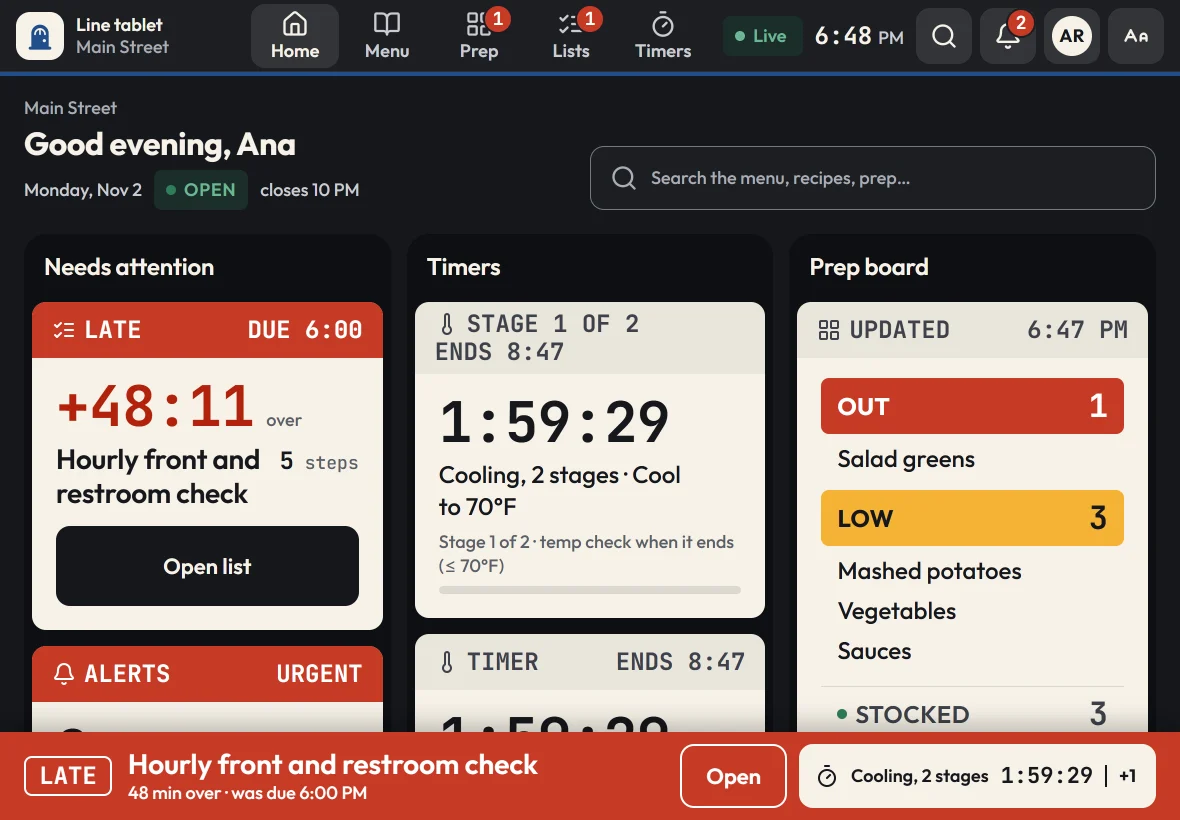
Cooling and holding timers
Timers that ask for the temperature.
Set up multi-stage timers for cooling, hot holding and reheating. When a stage ends, the tablet asks for a reading. A reading taken more than 15 minutes after the stage ended is logged as late and never passes, and a failed check stops the timer and tells the cook what to do next.
- Two-stage cooling, like 70°F in 2 hours, then 41°F in 4
- Several timers at once, always visible on the home screen
- Timers keep counting and alarming when the Wi-Fi drops
Temperature log
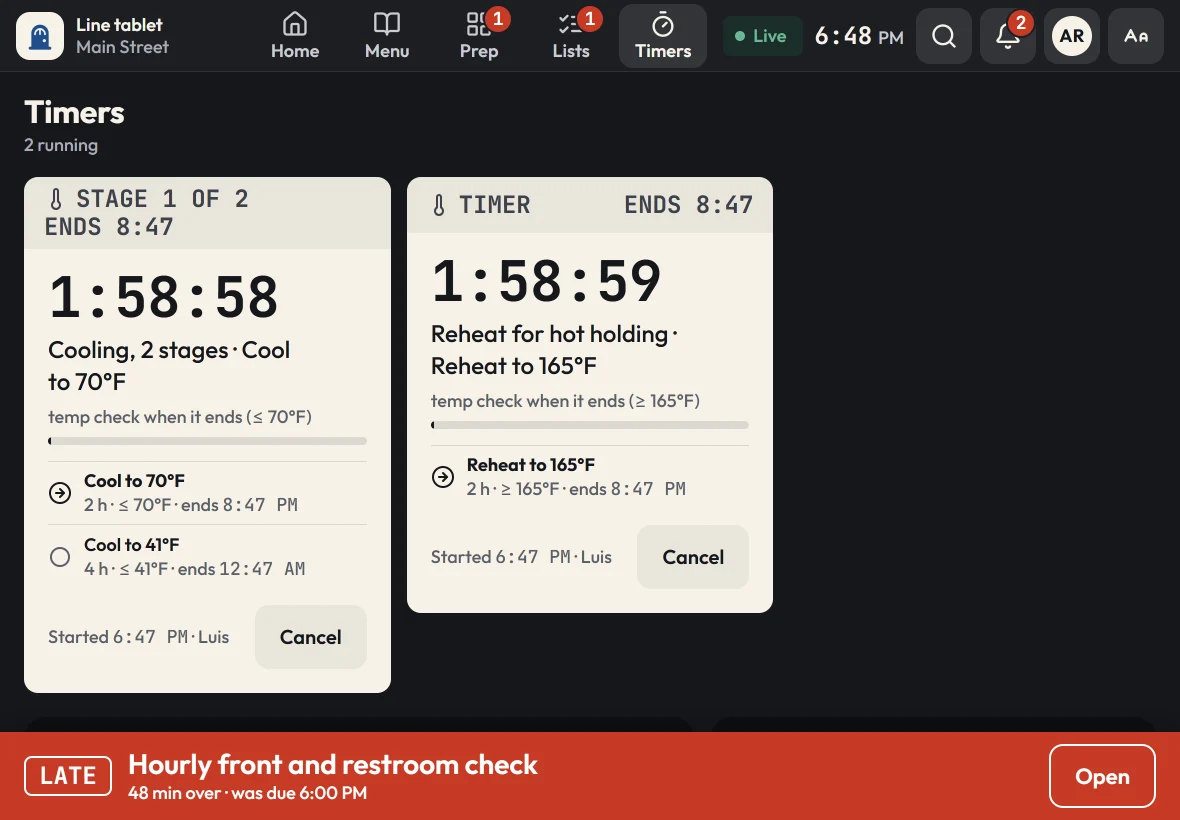
Every reading, with a name and a time.
Each reading a cook enters, from a timer stage, a checklist step or a recipe's cook-to check, lands in the temperature log. Managers see it in the admin for today, the last 7 or 30 days, or any dates, for one location or all of them.
- Failed readings stand out in red
- Search by item, like "walk-in" or "chicken"
- Download the log as CSV for an inspector or your HACCP file
Use-by labels
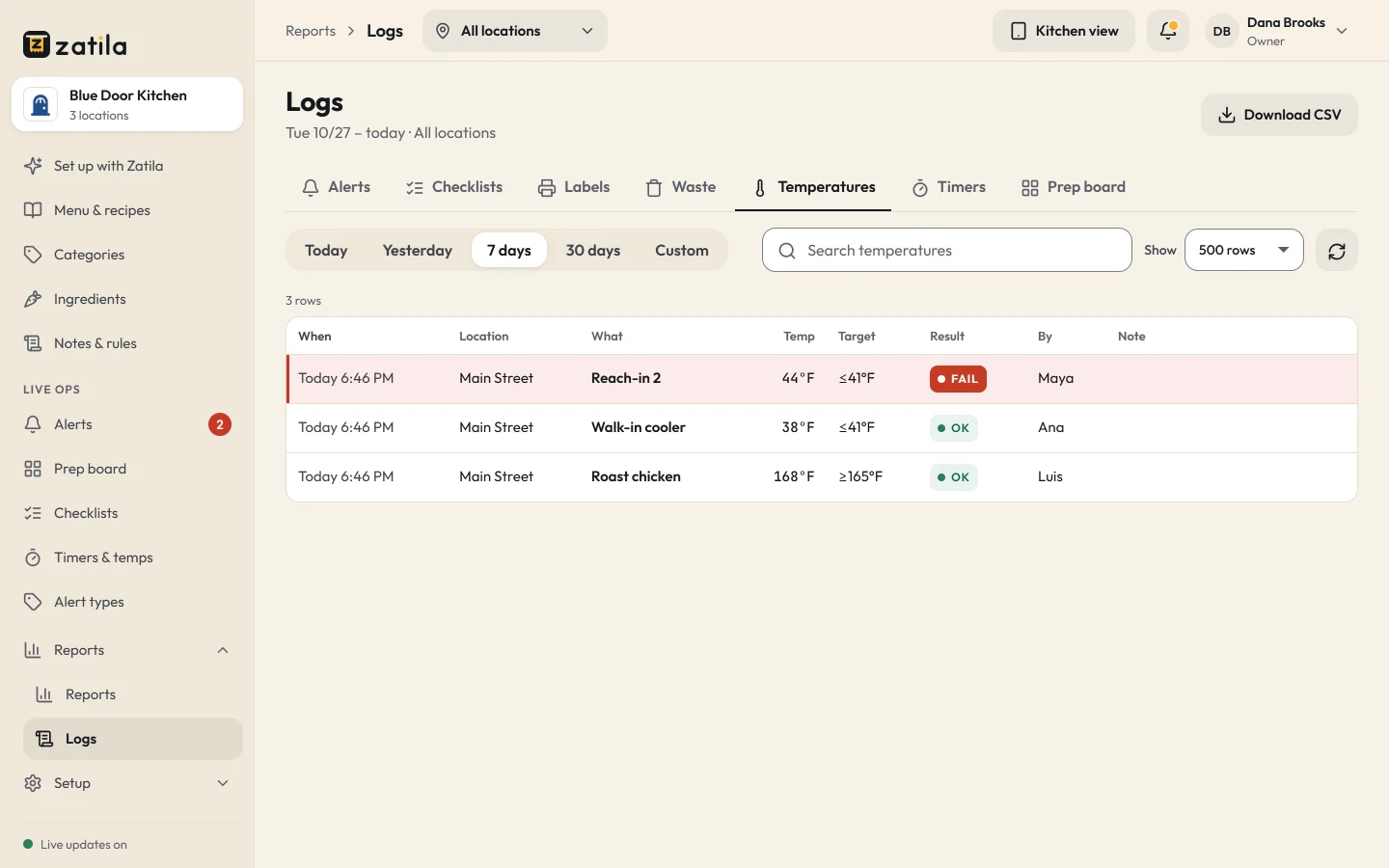
Date labels in two taps.
When a cook finishes a batch, Zatila works out the use-by date from that item's shelf life and prints a label with the item, the made date, the use-by date and who made it. The Labels screen lists what to use today and what to throw out now.
- Shelf life set once per recipe or prep item
- A color band for each day of the week
- Thrown-out batches go straight onto the waste log
Line checks
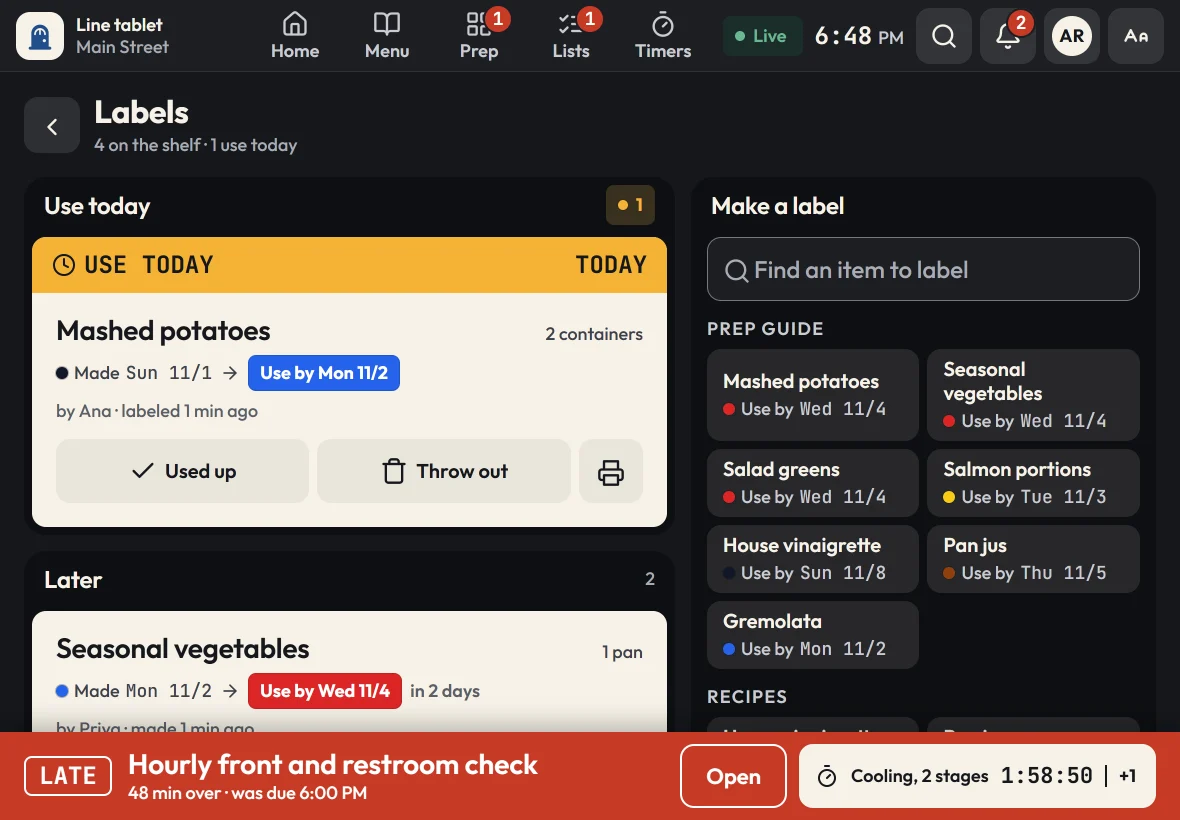
Food-safety checks on a schedule.
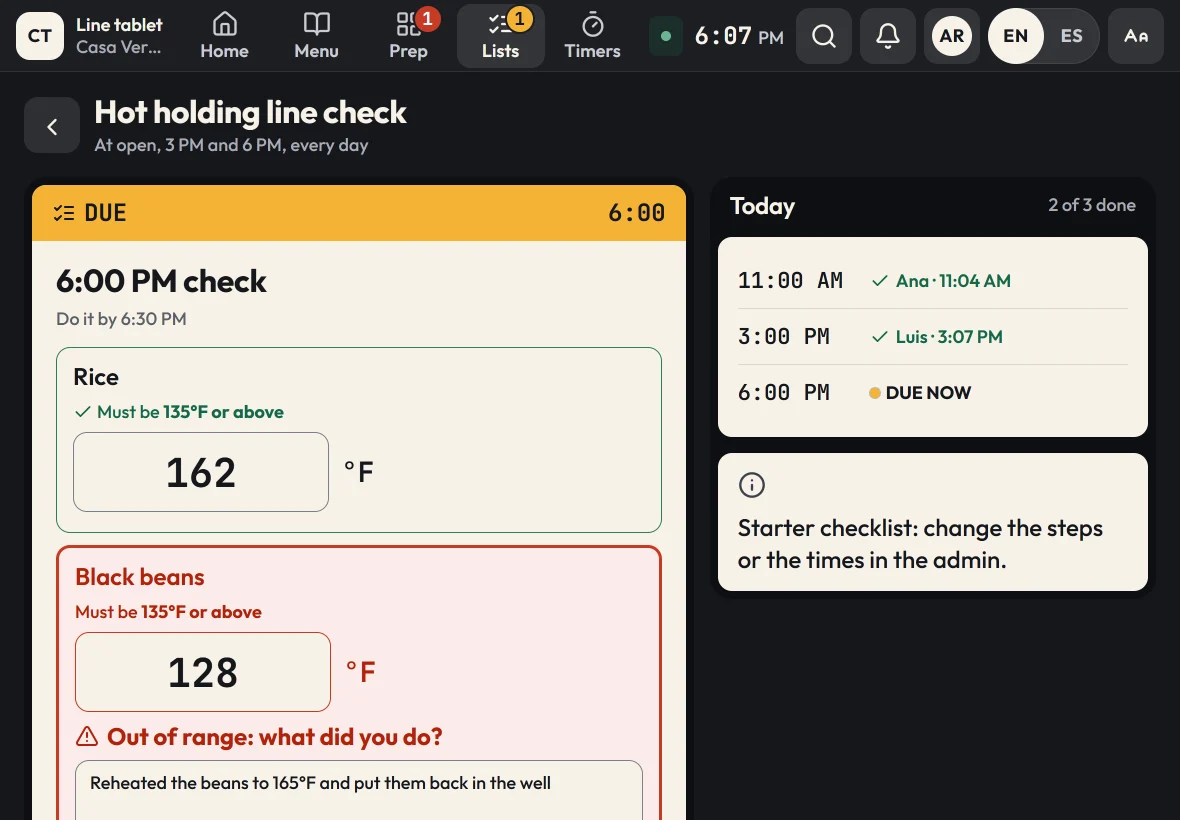
Put the opening temperature walk, hourly line checks, sanitizer changes and closing cleaning on checklists that come due at the times you set. A late list moves to the top of every tablet with a sound the line can hear.
- Steps that ask for a temperature or pH against a target, like 41°F or below
- A reading out of range needs a corrective action before the list is done
- The reading, the target and the action, in the temperature log with a name
How it works
How food-safety logging works in Zatila
- 01
Upload what you have
Send your recipe cards, cooling procedures or HACCP plan. Zatila sets up timers, cook-to temperatures and shelf lives for you to review.
- 02
Check and approve
Change any stage, target or shelf life before your team sees it. Nothing reaches the tablets until you approve it.
- 03
Cooks follow the prompts
Timers ask for readings, recipes show the cook-to temperature, and labels print with the right date.
- 04
Review the log
See every reading in the admin, follow up on failed checks the same day, and download the records when you need them.
Is Zatila a HACCP plan?
No. A HACCP plan is your own written food-safety plan, built around your menu and approved where your health department requires one. Zatila is the tool your team uses to follow it on the line: timers for the critical cooling and holding steps, temperature checks with pass or fail, and a log you can show an inspector.
Which temperatures should a restaurant log?
Most kitchens log cooling (the FDA Food Code calls for 135°F to 70°F within 2 hours, then to 41°F within 4 more), hot holding at 135°F or above, cold holding at 41°F or below, reheating for hot holding to 165°F, and final cook temperatures. Your local health code has the final word, so set Zatila's targets to match it.
What happens when a temperature check fails?
The tablet marks the reading as failed, stops the timer and tells the cook what to do next. The reading shows in red in the admin log with the time and the cook's name, so a manager can deal with it during the shift instead of finding it days later.
Can cooks record pH, like for sushi rice?
Yes. A checklist step can ask for a pH reading against a target you set, like pH 4.6 or below. If the reading is out of range, the cook writes down the corrective action before finishing the list, and the reading and the action go into the log with the cook's name.
Can I download our temperature logs for an inspection?
Yes. Owners and managers filter the temperature log by dates and location in the admin and download it as a CSV file that opens in Excel or Google Sheets.
Do the timers work if the Wi-Fi drops?
Yes. Timers run on the tablet itself, so they keep counting and alarming offline. Readings taken offline are saved on the tablet and sync as soon as the connection is back.
Pricing
Food-safety tools on every plan.
Timers, temperature logs, labels and checklists are in every plan, with unlimited tablets. You pay per open location.
Starter
For one kitchen getting organized.
$39per location
/ month$35 from the 5th location, $29 from the 10th
Start free$390per location
/ year$32.50 a month, billed yearly. $350 from the 5th location, $290 from the 10th
- Menu guides, recipes and the prep guide
- Prep board, checklists and use-by labels
- Food-safety timers with temperature logs
- Unlimited tablets
- Zatila sets up 50 items a month for you
Recommended
Pro
For busy kitchens and growing teams.
$69per location
/ month$59 from the 5th location, $49 from the 10th
Start free$690per location
/ year$57.50 a month, billed yearly. $590 from the 5th location, $490 from the 10th
- Everything in Starter
- Zatila sets up your whole menu, with no monthly limit
Chain
For groups with 10 or more locations.
Talk to usCustom
- Everything in Pro
- Setup help for every location
- Custom terms and invoicing
Coming soon and closed locations are free.
30-day free trial, no card.
Prices in US dollars. Tax is added where it applies.
Keep reading